Digital loyalty for barbers, takeaways, bakeries, salons and local shops
Turn customers into regulars
A free poster, plus a till sticker posted to UK shops. Your own digital loyalty card in their Apple or Google Wallet, with your logo and colours. Stamps fill in after every visit.
Ciccio’s Cafe has been rewarding its regulars since December 2024
Customers at this Sicilian café in West Byfleet scan in at the counter and work towards a free coffee and pastry, then a meal and a family dish.
460+customers joined
1,900+rewards redeemed
8 in 10came back for another visit
“Our customers loved it. They don’t want to download apps.”
Buna Beans Coffee House
“It’s great for getting students in.”
The Med, Greek street food
“Our customers loved it. They don’t want to download apps.”
Buna Beans Coffee House
“It’s great for getting students in.”
The Med, Greek street food
Made for businesses with regulars
If customers come back, loyalty works. RewardLoop runs on visits and spending, so it fits almost any counter.
Coffee shops
Bubble tea & boba
Barbers
Hair salons
Nail bars
Takeaways
Sandwich shops
Bakeries
Dessert shops
Butchers
Corner shops
Car washes
Dry cleaners
Pet groomers
Not on the list? If you have regulars worth rewarding, it will work for you too.
Rewards that fit your trade
Your rewards. Your way.
Reward visits, spending or favourites. You choose.
A free cut after nine? A free coffee after ten? Money off a big shop? Give your regulars something worth coming back for.
Pick stamps, or show every reward with a picture.
How it works
Your digital stamp card, from setup to their next visit
Set up in about five minutes. Here’s what happens next.
1Step 1
Design your card
Try it here: type your shop’s name, choose what customers collect and pick a colour.
How you start
Find your shop on Google.
See your card and poster, and change anything.
Save it with a free account.
Add your plan and payment card, and go live when you’re ready.
Reward visits, drinks, meals, cakes or money spent. You can change any of it later.
How it looks in Apple Wallet
2Step 2 · Free for UK shops
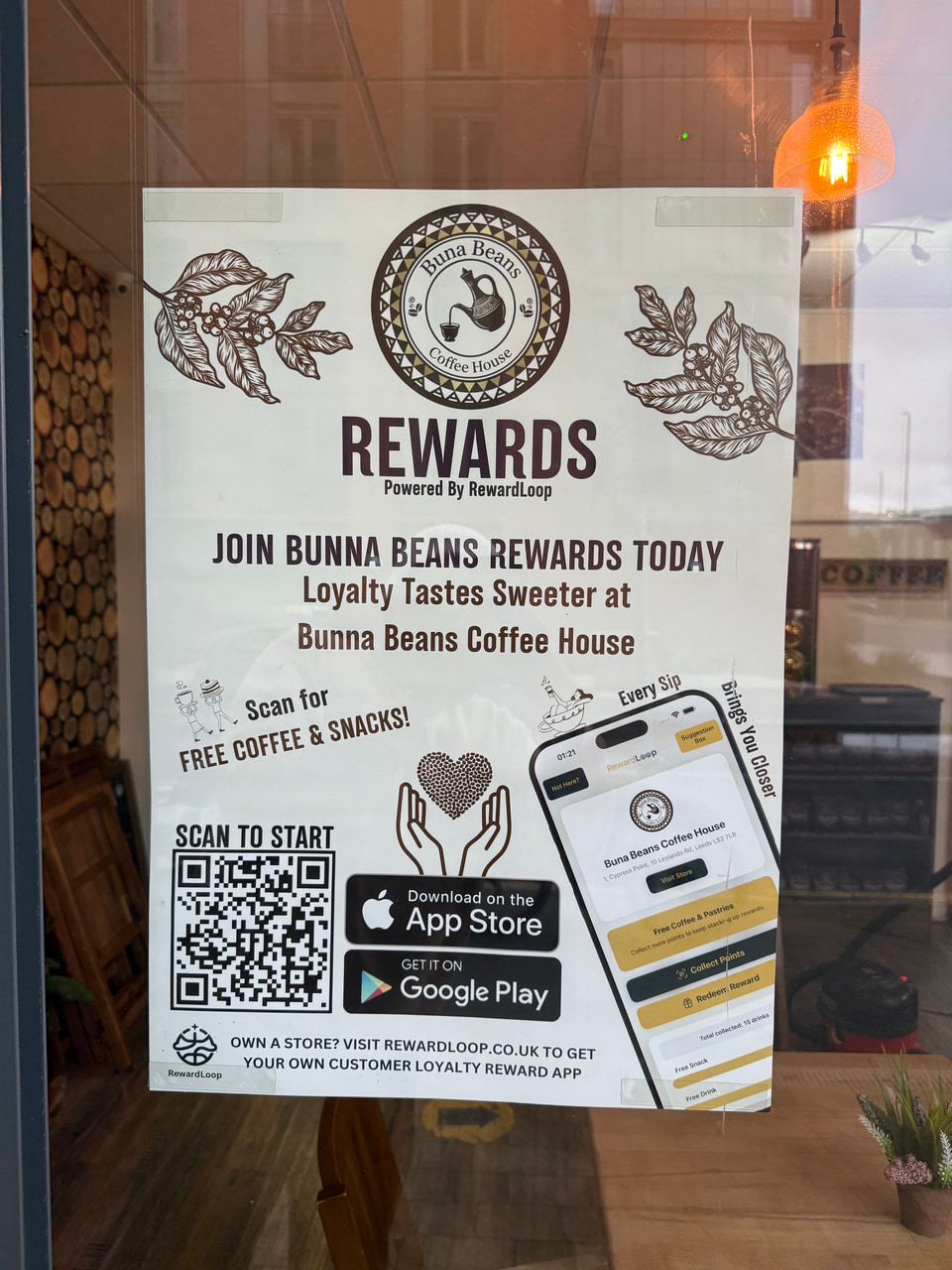
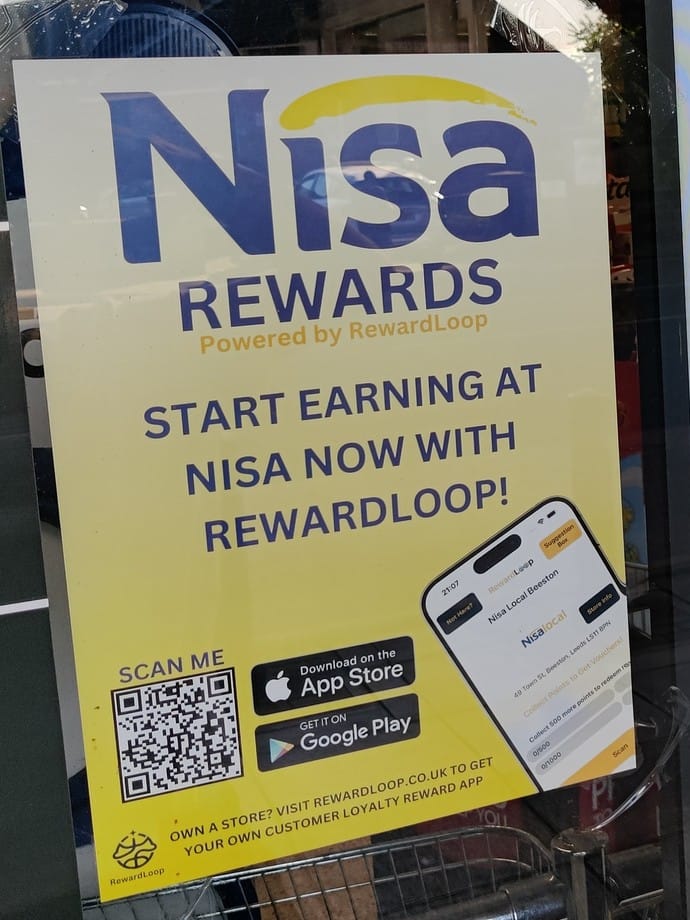
Go live, and we post you a free till sticker and poster.
A waterproof till sticker with your QR code
An A4 poster for your window
A welcome card with the till steps
Usually with you within a week.
The till stepsPut them upOpen your tillScan every visit
Real photos from shops, with Custom Design posters.
3Step 3
Customers add your card in seconds
They scan your poster with their phone camera, make a free account in their browser and add your card to Apple Wallet or Google Wallet. No app to download.
How customers join
In their Wallet
Your loyalty card
No app to download
Fills in after every visit
Tells them when a reward is ready
Apple Wallet and Google Wallet
or
Or in the app
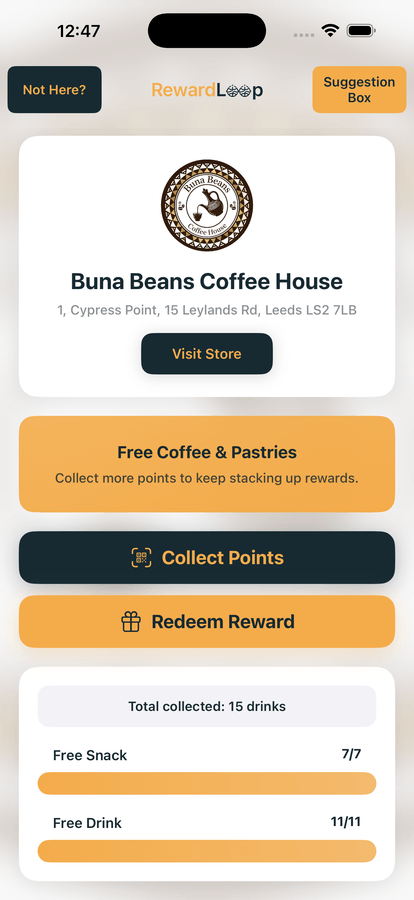
The RewardLoop app
All their rewards in one place
Find more local shops
Leave you anonymous suggestions
A bonus for you: your shop is listed in the app. Customers who use the app can find your shop there.
iPhone and Android
Same free account. Customers can switch any time.
4Step 4
It fills in and brings them back
Staff scan their card on the phone or tablet at your till, with no extra hardware. A stamp lands within a minute and their phone tells them when a reward is ready.
A Head Start on their first reward
Their Head Start2 of 10
✓✓
Give new members a few stamps to start. You choose how many. They’ll still need to make a purchase before earning their reward.
Backed by research. In a published study, customers who started with two free stamps were nearly twice as likely to finish their card. Nunes & Drèze, 2006.
A nudge to pop back
Example
Reminders go out on their own, to their card or the app, when a customer is close to a reward or has one waiting. Got news? Write it in your dashboard and we check it before it goes out.
Head Start is on to start with. Change it or switch it off any time. Essential includes one announcement a month. Customers can turn notifications off at any time.
5Step 5
See what’s working
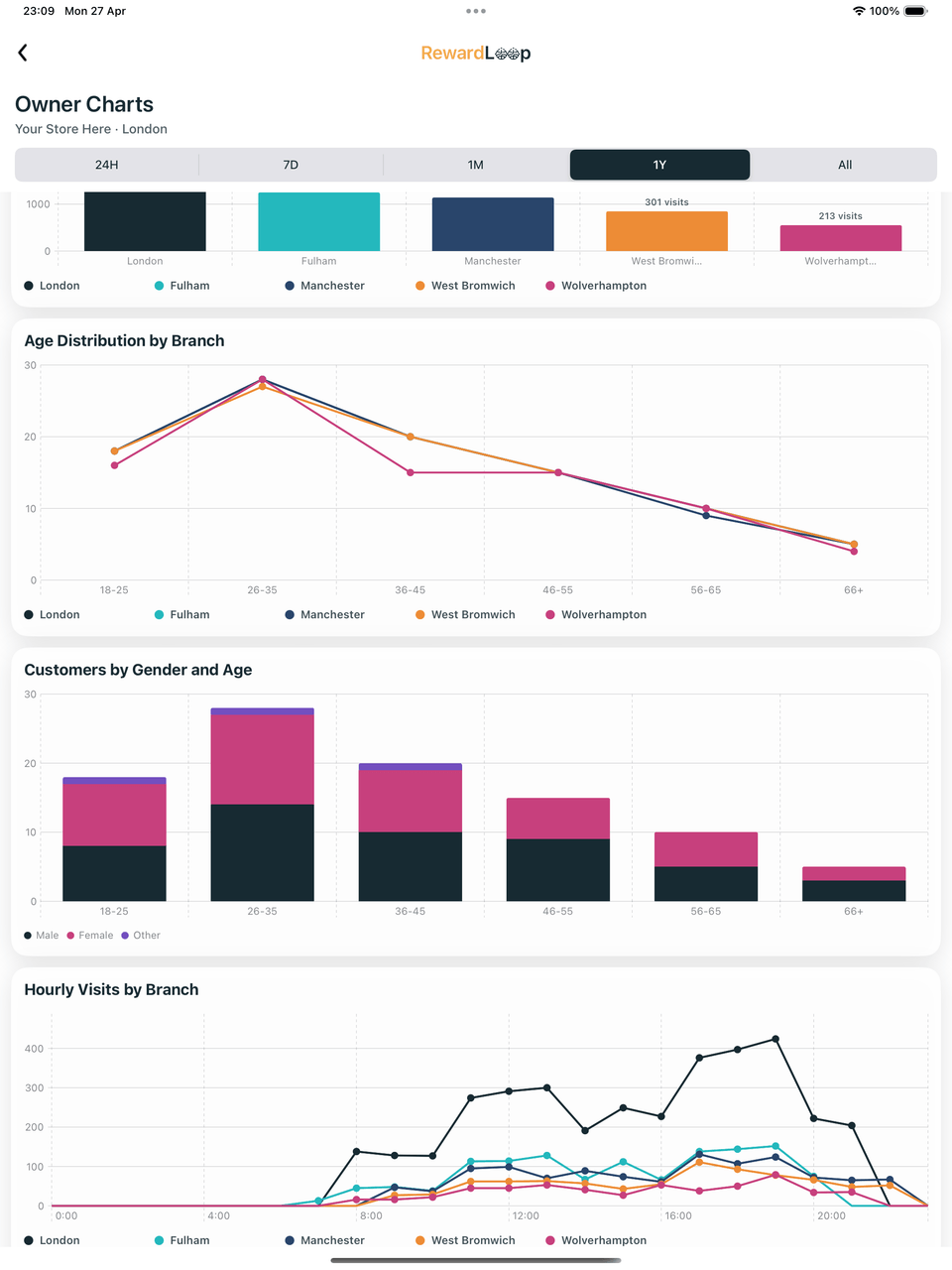
Your Data Hub shows who’s coming back, your busy times and which rewards get used. Check it online or in the app, even when you’re away from the counter.
With more than one shop, compare them all in one place.
Example data, not customer results.
Supported by
These organisations have supported RewardLoop. They aren’t partners, and their logos don’t mean they endorse our service.
Ciccio’s Cafe: 460+ customers joined, and 8 in 10 came back.From RewardLoop records, December 2024 to October 2026. Results vary by business.
We ask for a payment card before you go live. Your plan is free for 30 days, then it’s billed monthly unless you cancel. Prices shown are the total amounts charged; no additional tax is added at checkout.
Secure billing through Stripe.
Questions first? Call 0115 822 3654, Monday to Friday, 9am to 6pm UK time, or leave your number and we’ll call you back.
Quick answers
A few useful answers
Can food count as well as coffee?
Yes. Count drinks for a classic coffee card, or count visits or money spent so food counts too. You can change it later.
Can staff stamp a round of drinks at once?
Yes. Staff choose how many drinks to add, so a round of four earns four stamps.
Do walk-ins and booked clients both collect?
Yes. Anyone can add your card by scanning your poster, however they came in. Staff scan their card after each cut, on the phone or tablet at your till.
Can bigger services earn more?
Yes. Count visits for a simple stamp card, or count money spent so a cut and beard trim earns more than a quick tidy.
Our services vary in price. What should we reward?
You could count money spent, so a colour earns more than a fringe trim, or count visits for a simple stamp card. You can change it later.
Does it work with our booking system?
It runs on its own, so nothing changes in your booking app. Staff scan the client’s card when they pay.
Can someone buying for friends get a stamp for each drink?
Yes. Staff choose how many drinks to add, so three drinks earn three stamps.
Can we tell customers about new flavours?
Yes. Write news in your dashboard and it goes to their card once we’ve checked it. Essential includes one announcement a month.
Do delivery app orders count?
Stamps are added when staff scan the customer’s card at your counter, so walk-in and collection orders count. Orders through delivery apps don’t.
Can bigger orders earn more?
Yes. Count meals and staff add one for each meal in the order, or count money spent so a family order earns more.
Customers often pop in for one thing. Does it still work?
Yes. Count visits, so every purchase earns a stamp, however small.
Will it slow down a busy morning queue?
Staff scan the customer’s card on the phone or tablet at your till in a few seconds, and the stamp appears on their card within a minute.
Can a family or group get a stamp each?
Yes. Staff choose how many desserts to add, so a table of four earns four stamps.
Can we tell customers about new flavours?
Yes. Write news in your dashboard and it goes to their card once we’ve checked it. Essential includes one announcement a month.
Do customers have to download an app?
No. They scan your poster, make a free account in their browser and add your card to Apple Wallet or Google Wallet. Staff scan the card at the till and stamps fill in on their own. The RewardLoop app is optional, for customers who want more.
“Our customers loved it. They don’t want to download apps.”
Buna Beans Coffee HouseWhat if my customers don’t use it?
Customers join when they see your poster and when staff ask at the till, so ask everyone. In the UK, your free till sticker puts your QR code right where customers pay. Joining takes seconds, with no app to download. A Head Start can give new members a few stamps to begin with. If your first few days are quiet, we’ll email you tips and offer to help. And if it isn’t for you, cancel online within the 30 days and you won’t pay for your plan.
I’m not good with technology. Can I still use it?
Yes. Setup takes a few simple steps, and if you’d rather not do it yourself, we’ll set your card up for you. Staff open the till on the phone or tablet at your counter: go to rewardloop.co.uk/till, or use the RewardLoop app. In the UK, the welcome card we post you has the steps. Stuck? Call us on 0115 822 3654, Monday to Friday, 9am to 6pm UK time.
What do staff have to do?
Ask every customer if they’ve got your card, and scan it on every visit. Staff open the till at rewardloop.co.uk/till on a phone or tablet (or use the RewardLoop app), signed in with the till login every shop gets when it goes live, so they don’t need yours. They scan a customer’s Wallet card, or show a QR code for app customers to scan. It takes a few seconds.
Can I change my card later?
Yes. Change its colour, stamps and name any time in Settings. Customers’ cards update on their own.
Do we need new till hardware?
No. Use RewardLoop on a trusted phone or tablet behind the till. Staff can record purchases and handle app or Wallet customers from there.
Do I have to print anything?
No. If you want to start straight away, your poster is ready to download and print the moment you go live. We also post UK shops a free waterproof till sticker and an A4 poster, usually within a week, with a welcome card that has the till steps. You can print more posters any time. Need another sticker or an A3 poster? Just ask, it’s free.
What counts as an active customer?
A customer with loyalty activity in the last 12 months. Essential covers up to 100 active customers. Unlimited has no limit, and you can add more shops to it.
When do I pay?
Creating your account and setting up are free. We ask for a payment card before you go live, and your plan is free for 30 days from then. Monthly billing starts on day 31, unless you cancel before then. We email you a week before your first payment, so it’s never a surprise. Custom Design, if you choose it, is charged when you go live.
How do I cancel?
Online, any time, from Billing in your RewardLoop dashboard. Cancel within the 30 days and you won’t pay for your plan. You can also call or email us and we’ll do it for you.










 Secure billing through Stripe.